1. Home
  2. Services
  3. Leaves & Requests
People & payroll

Leaves & Requests

Leave and permission requests with approvals and live balances.

Set up leave types and policies, let employees apply from the app and approve requests in one place. Balances update automatically and every request keeps its history.

  • Leave types
  • Apply in a few taps
  • Approvals

Part of GotIt Cloud Web portal & GotIt Mobile

Approve Requests page with today's and monthly leave counts
How it works

Leaves & Requests in 4 steps

From first setup to everyday use.

  1. Step 1:

    Create leave types

    Set days, carry forward, encashment and compensatory off for each type.

  2. Step 2:

    Assign approvers and users

    Choose who approves and which employees each leave type applies to.

  3. Step 3:

    Publish balances

    Review the draft balances and publish them for the year.

  4. Step 4:

    Apply and approve

    Employees apply from the app; approvers act with the balance in front of them.

See it in action

Inside Leaves & Requests

Real screens from GotIt.

Approve requests in GotIt
01

Approve with context

Approve Requests lists every leave request with its type, duration, working days, status and history.

  • Today's and this month's leave counts
  • Working days worked out for you
  • Full action history per request
Leave setup in GotIt
02

Set up leave the way your policy works

Setup walks from leave type to approvers, users and draft balances before anything goes live.

  • Carry forward and encashable options
  • Compensatory off support
  • Draft balances reviewed before publishing
Request balances in GotIt
03

Balances that add up

Request Balances shows each employee's opening, allocated, used, loss of pay, carry forward, encashment and closing balance.

  • Year-wise balance per leave type
  • Loss of pay tracked separately
  • Leave reports with charts and filters
What you get

Everything included in Leaves & Requests

Leave types

Casual, sick, earned and your own types, each with its own rules.

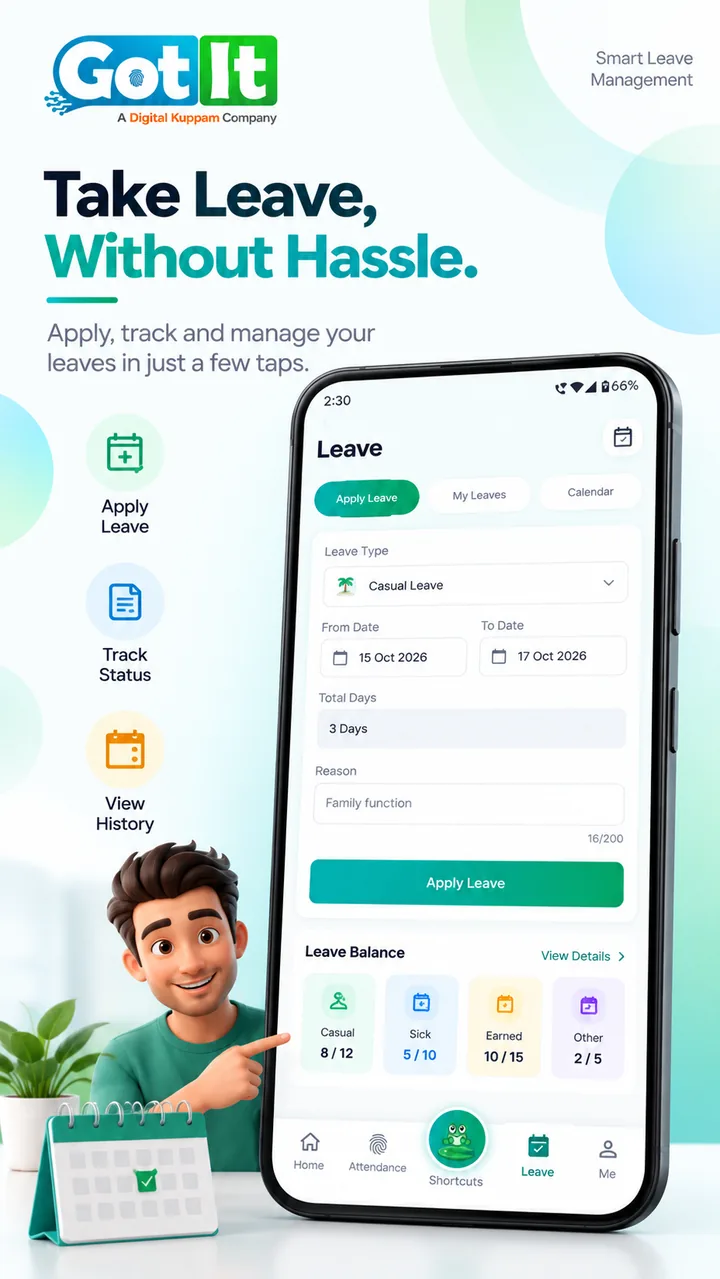
Apply in a few taps

Employees pick the type and dates, add a reason and submit.

Approvals

Managers approve or reject with the balance in front of them.

Live balances

Balances update as soon as leave is approved.

Permission requests

Short permissions for a few hours, tracked like leave.

Comp off

Credit time off for work on a holiday or weekly off.

Who uses it

Built for HR and for every employee

Admins and HR

  • Configure leave types and policies
  • Approve requests with balances shown
  • See who is on leave today
  • Assign approvers for each leave type
  • Track opening, used and closing balances by year
Where Web portal

Employees

  • Apply for leave or permission
  • Track approval status
  • Check balances and history
  • See pending, approved and rejected requests
  • Request short permissions
Where GotIt Mobile Web portal
GotIt Mobile leave screen with leave application and balances
FAQ

Common questions

Can we create our own leave types?

Yes. Add leave types beyond casual, sick and earned and set their rules.

Does approved leave affect payroll?

Approved leave is part of the attendance record payroll uses, so paid and unpaid days are counted correctly.

Can leave carry forward to next year?

Yes. Carry forward and encashment are set for each leave type.

Is compensatory off supported?

Yes. Compensatory off (C-OFF) can be enabled on a leave type.

Who approves leave?

You assign approvers for each leave type during setup.

Related

Works well with

GotIt support team ready to help you get started

Ready to try Leaves & Requests with your team?

Start a 7-day free trial with every module, or book a demo and we will walk you through it.